
Since July every model call our agents make goes through TRUE LLM Proxy, and each project has its own service key, balance and usage history. That answers how much a project spends. It doesn’t answer what inside the project spent it. An agent built on true-adk is usually a tree: a root agent, a few sub-agents and the tools they call. Some serve several organizations from one deployment, under one service key. When the bill for such an agent goes up, the proxy can say by how much, but not whether it was the planning sub-agent, one expensive tool or one tenant using the product far more than the rest.
The proxy is the only component that knows a call’s real cost, and it has no idea what the call was for. The agent knows what the call was for and nothing about its cost. On September 13 we wrote the piece that joins the two: a usage context that every request carries from the agent to the proxy, labelled automatically and published as CloudWatch metrics. Both halves, in the agent framework and in the proxy, are written and tested, and they’re the next thing we’re rolling out in TRUE Agents. This post describes how they work.
A usage context on every call
The context is a small immutable object with two buckets of labels, dimensions and properties. It lives in a Python contextvars variable, which makes it local to the task that’s serving a request. Two concurrent requests in the same process never see each other’s labels, and an LLM call made deep inside a sub-agent inherits whatever the request handler set, with no parameter threaded through the code.
On the wire it travels as one header, X-True-Usage, holding base64url-encoded JSON with a schema version and the two buckets. A header survives LiteLLM’s drop_params and leaves the request body exactly as the OpenAI-compatible API expects it. The context caps itself before it gets there. It takes at most 10 dimensions and 40 properties, with keys sanitized and values cut to 256 characters, and if the encoded header passes 4,096 bytes it drops the properties and sends the dimensions alone.
The awkward part was timing. In true-adk an agent’s model object is built once, at import, by create_proxy_model. Labels are per request. The change installs its own LiteLLM client on that model, and the client reads the current context and adds the header at the moment each call goes out. That’s what lets a model object created at import carry a different tenant on every request.
flowchart LR
    C[Consumer app] -->|X-True-Usage, optional| A[Agent /chat]
    A --> S[Sub-agent and tool callbacks]
    S --> L[LiteLLM client stamps the header]
    L --> P[TRUE LLM Proxy]
    P --> E[EMF line on stdout]
    E --> M[CloudWatch metrics]
    E --> I[Logs Insights queries]
Labels without writing code
create_server walks the agent tree at startup and attaches ADK callbacks to every agent in it. Before each model call, a callback sets Task to the sub-agent making the call and records the invocation ID. Before a tool runs, another sets Tool and starts a timer, and when the tool finishes a third emits ToolInvocations and ToolLatencyMs for it. The chat routes bind the request’s context and emit turn counts and latency.
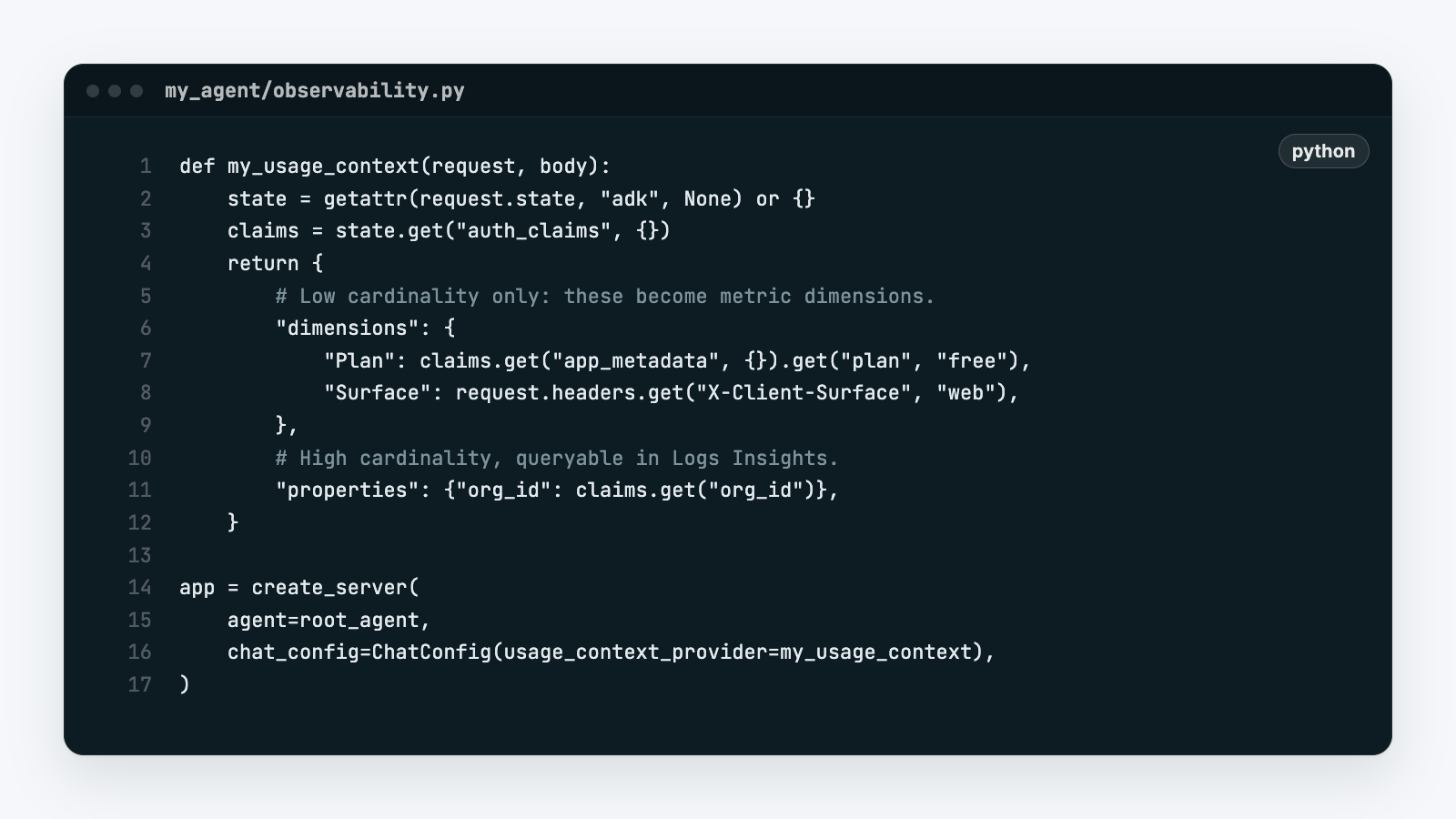
With no code of its own, an agent’s calls are labelled with Agent (from TRUE_AGENT_NAME), Task, Tool, Tenant (from the tenant middleware, when the agent uses it) and Environment. User, session and invocation IDs go along as properties. Each agent can add what matters to its own business through a hook on its chat config that receives the request and returns extra dimensions and properties, a plan or a client surface, for instance.
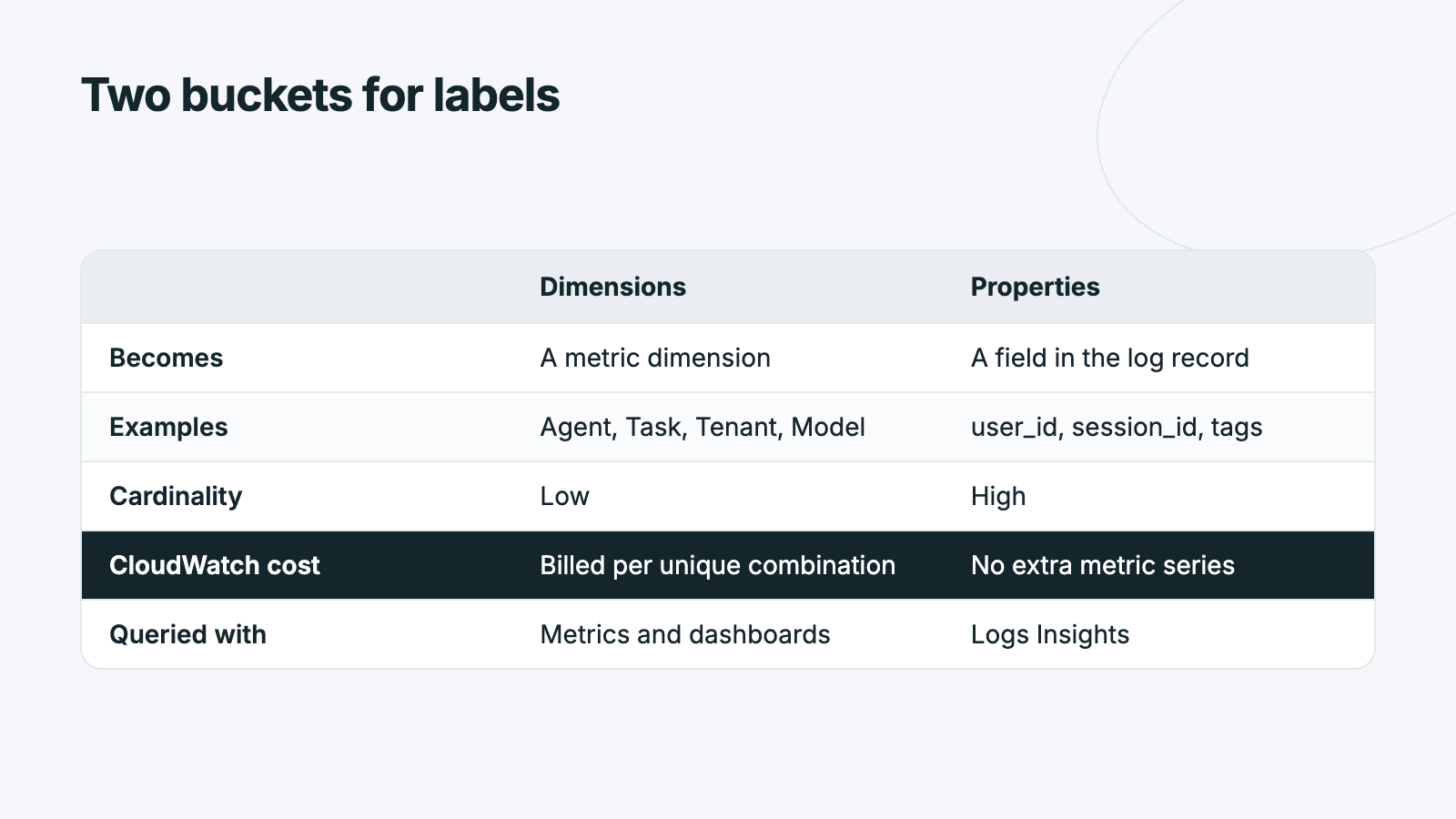
Dimensions and properties cost very different amounts
The split into two buckets is the central design choice, and it comes from how CloudWatch bills. Every unique combination of dimension values on a custom metric is a separate metric series, and each series is billed. A dimension with a handful of values (agents, environments, models) is cheap. A dimension with one value per user turns every user into a series. The README puts it bluntly: a user_id dimension on a consumer product is a five-figure CloudWatch bill.
Properties don’t create series. They’re fields in the log record, so they stay queryable in Logs Insights. A query like stats sum(CostUSD) by user_id answers what one user cost without a single extra metric. Agent, sub-agent, tool, tenant, plan, surface and model go in dimensions. User, session, invocation and request IDs, plus any free-form tags, go in properties.
Metrics as log lines
Nothing calls PutMetricData. Metrics are written as CloudWatch Embedded Metric Format: one JSON line on stdout with an _aws block that names the namespace (TRUE/Agents by default), the dimensions to publish and the metrics, followed by the values and every label as a plain field. When that line reaches a log group, CloudWatch extracts the metric and keeps the record. There’s no network call on the request path, no throttling to handle and no extra permission beyond writing logs. The repo ships a compose override that sends the container’s stdout to a log group with the awslogs driver, and TRUE_METRICS_SINK=noop switches metrics off.
The proxy’s half
The proxy already computes the USD cost of every call in order to debit the service’s balance. Its side of the change reads the X-True-Usage header and publishes that cost with the caller’s labels. On success it emits the request count, the USD cost, the TRUE tokens charged, the token counts (input, output and cache) and latency. On failure it emits an error count, with a separate metric for when the token counter rejects a charge. Three dimensions are always derived on the server. Service comes from the authenticated key and Model and Environment from the proxy itself, so a caller can’t send a header that bills its calls to another service. Caller dimensions are sanitized and capped the same way as in true-adk, and the usage record is published before the charge, so an outage in the token counter can’t lose it.
Before it rolls out
The framework side has unit tests for the context, the metrics emitter and the request resolution. It also has an end-to-end test of the chat routes, which checks that the labels are actually bound while the agent runs, including on the streaming route, where the response body is produced after the handler has returned. It also checks that both the agent’s hook and the caller’s header reach the model call. What’s left is rolling it out to the agents we run.