
TRUE POS is our point of sale and system of record for small businesses in Mexico, from cafés to family-owned chains. This week it got a loyalty program. A business sets up a roadmap of visits, where each qualifying visit earns the reward for the next one (“your next visit: a free pastry”). Customers keep a card on their phone without installing anything and the register scans it. Invitations bring in their friends. This post covers how a sale becomes a visit, the rules a reward can carry, why a reward is a copy and how invitations avoid paying for made-up sign-ups.
Customers are their phone numbers
A loyalty program needs to know that today’s customer is the one from last Tuesday, and at a counter the phone number is what people will give. So the first change makes the phone a key. A number is normalized however it’s written. Ten digits are taken as Mexican and get the country code, and the old mobile format with an extra 1 after the country code is folded into the current one. A business has at most one customer per phone.
Creating a customer with a phone the business already has returns that customer instead of a duplicate. Whatever the existing record lacks is filled in and a new consent to promotions is recorded, but nothing is overwritten or revoked. That matters for a point of sale that works offline. Two registers that each registered the same person without a connection end up with one customer once they sync. Consent is stored with when it was given and where (the register, the admin console or the web). Customers without a phone work exactly as before.
When a sale counts as a visit
A sale with a customer counts as a visit when three things hold. The program has to be running that day, since a business can give it start and end dates for a campaign. The order has to reach the program’s minimum. And the customer can’t already have a visit that day. That last rule is a unique constraint in the database on program, customer and day, applied only to visits that haven’t been voided. If two of the same customer’s sales race for the same day, one insert wins and the other is simply not a visit.
Visit N earns the reward of step N + 1, valid for a number of days the business sets (30 by default) and usable once. The first visit earns the second step’s reward, which is what the card shows as "your next visit". Since October 21 a sale and its visit are saved in the same transaction, so a sale can’t exist without the visit it earned.
The minimum needed a correction the same night. Its purpose is to keep someone from buying the cheapest item on the menu to collect a visit. But a customer who redeems a reward pays less than the order was worth, and the first version compared the minimum with what was paid. A visit that used a reward could stop counting as a visit. Now the register sends what the reward took off and the server stores it on the reward. The minimum is checked against what was paid plus that value. The stored value is capped at the order’s subtotal, so a reward can never be worth more than the order it was used on.
Rules a reward can carry
Each step’s reward is described by rules in JSON that the register applies. A rule can require something in the order (a category or a product) and then gives one or more things:
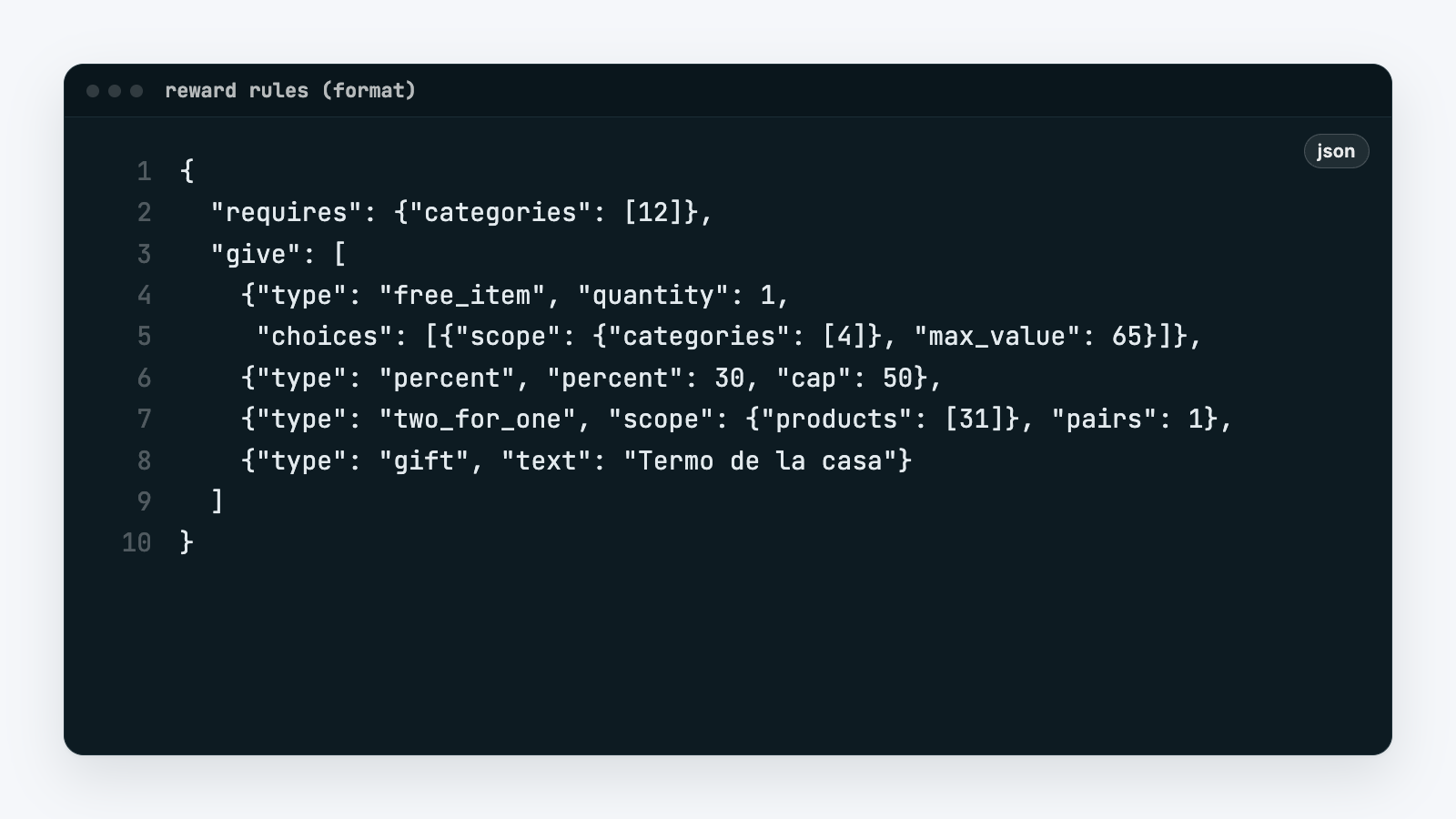
The register computes the amount from the sale’s lines, with the same rules the server uses, so the cashier sees the result before charging. When a reward needs something the order doesn’t have, or nothing in the order is eligible, the register says which of the two it is.
A reward is a copy
When a reward is issued, it copies the step’s title, description and rules. Later edits to the program never change a reward a customer already holds. If a business changes the fifth visit from a free pastry to 10% off, everyone already holding the pastry still gets the pastry.
Redeeming happens online at the register before the sale is saved, so the same reward can’t be spent at two registers. If the sale then fails, the register calls a release endpoint and the reward is available again. Deleting a sale voids its visit and cancels any unused rewards that visit earned. Rewards that were already used stay used.
sequenceDiagram
    participant C as Cashier
    participant R as Register
    participant S as Server
    C->>R: Scan the customer's card
    R->>R: Find the customer locally by card code
    R->>S: Ask for visits and rewards
    C->>R: Apply the reward to this sale
    R->>S: Redeem the reward
    R->>S: Save the sale with the reward's value
    S->>S: Count the visit and issue the next step's reward
The card and its code
Every customer gets a card code when they’re saved, made with secrets.token_hex(12). It’s 24 characters of digits and the letters a to f, chosen so a barcode scanner types it the same on any keyboard layout and in either case. The same code is in the link to the customer’s card page and in the QR the register scans. When a scanner set to another layout types the slashes and colons of the link as other characters, the register still finds the code after the mi segment of the path. Card codes travel with the register’s customer sync, so a scanned card is found even offline. A code the register doesn’t know asks for the phone instead.
The card page is public and shows the customer’s first name, their progress on the roadmap and their rewards. It never shows the rules behind a reward or the customer’s phone.
Invitations
With invitations on, each customer’s card carries a link to share with up to a set number of friends (three by default). The invitation code is the customer’s first name plus five characters from an alphabet without look-alike characters. A friend new to the business signs up through it with their name, phone and consent, on a public page with protections against automated sign-ups.
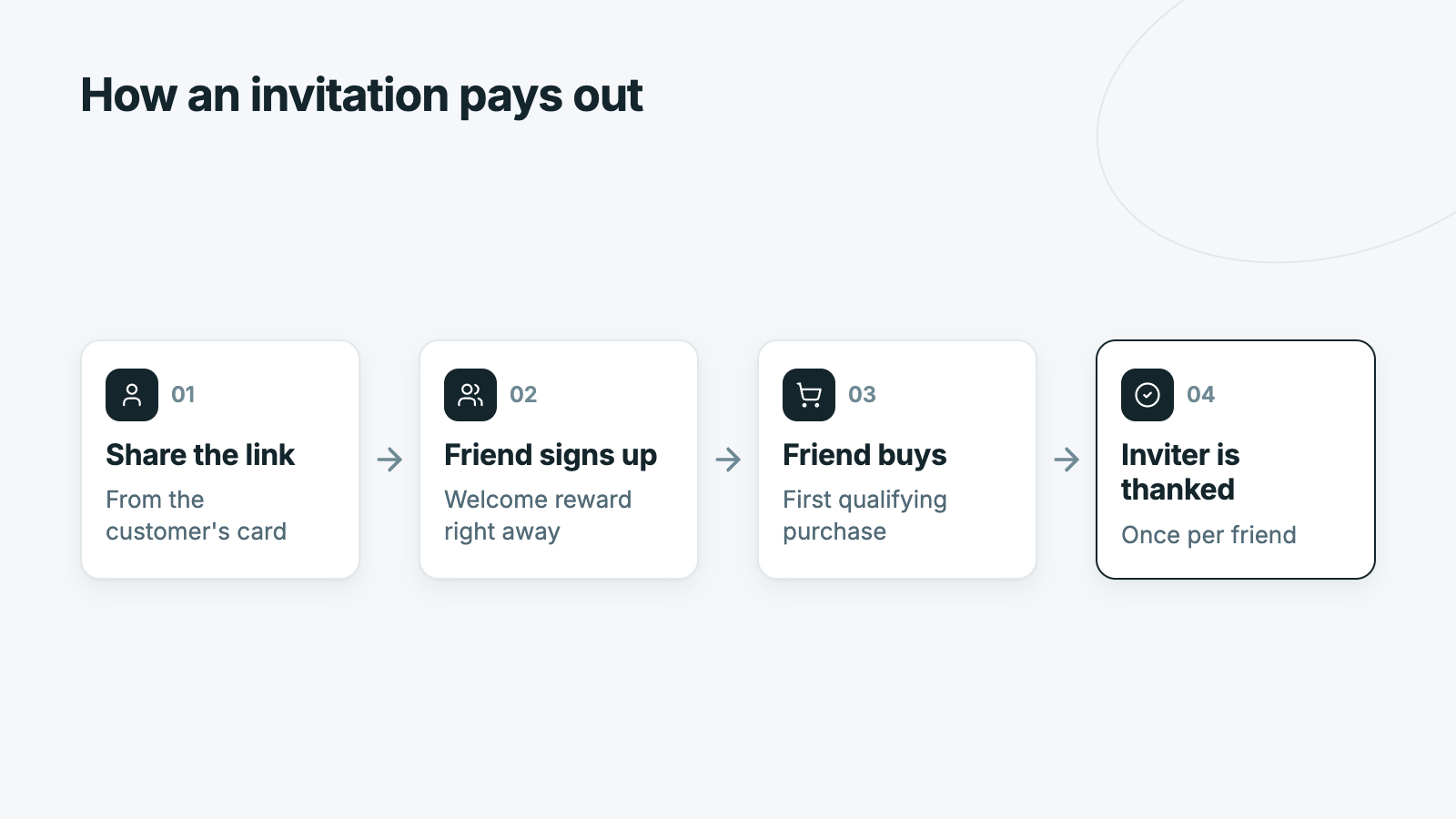
The program’s page in the admin console shows members and visits (overall and in the last seven days), rewards by state and how many invited friends signed up and bought.