
Most of what our agents do is read. They look up a profile, search a catalog, run a query or summarize a ticket. A smaller set of tools write: they send an email, delete a record, place an order or log food to a diary. When a read goes wrong the user asks again. When a write goes wrong the email is already in someone’s inbox.
The tempting fix is a line in the prompt telling the agent to confirm before it saves anything. That mostly works, but it leaves the safeguard as a suggestion the model is free to skip on a bad day. It also means the user approves by typing “yes” into a chat box without seeing the exact values that are about to be written. A model that misread “150 grams” as “1,500 grams” will happily ask “shall I log it” and get a yes.
In TRUE ADK the confirmation lives on the tool instead of in the prompt. A tool marked with require_confirmation can’t run until a person presses a button on a card that shows the arguments the model actually chose. Tools without the flag run exactly as they did before, so the conversation only pauses where a pause is worth it.
How a call becomes a card
Google ADK owns the pause and the resume. TRUE ADK sits in the middle, turning the pause into a card on the stream for the frontend to render with the A2UI React packages.
sequenceDiagram
    participant U as User
    participant UI as Chat UI
    participant S as TRUE ADK server
    participant A as ADK runner
    participant T as make_purchase
    U->>UI: Buy 3 laptops at 1200 dollars each
    UI->>S: POST /chat/stream
    S->>A: run the turn
    A->>A: model calls make_purchase
    A-->>S: adk_request_confirmation event
    S-->>UI: confirm_request with an A2UI card
    U->>UI: presses Purchase
    UI->>S: POST /chat/stream with function_response
    S->>A: resume with confirmed set to true
    A->>T: run with the original arguments
    T-->>A: result
    A-->>S: final response
    S-->>UI: streamed answer
When the model calls a tool that requires confirmation, ADK doesn’t run the function. It records a confirmation request and emits a synthetic function call named adk_request_confirmation whose ID sits in the event’s long_running_tool_ids. The tool’s placeholder result says the call needs approval. ADK ends the turn there instead of asking the model to describe a result that doesn’t exist yet.
TRUE ADK’s event normalizer checks every event for that synthetic call before it looks at anything else. When it finds one, it pulls out the original tool name and arguments, builds a surface with the ID confirm_ followed by the call ID and sends a confirm_request event on the SSE stream. The event carries A2UI v0.9 messages (a createSurface and an updateComponents) plus the call ID and tool name.
On the frontend, @a2ui/web_core processes those messages and @a2ui/react renders the surface. Both buttons dispatch the same confirm event with a value of true or false. The client then sends a new turn to the same /chat/stream endpoint, carrying a function_response named adk_request_confirmation with the synthetic call’s ID and a confirmed flag. ADK resumes the paused tool with that confirmation attached. If it’s confirmed, the function runs with the same arguments the card was built from. If it isn’t, ADK returns “This tool call is rejected.” without ever calling the function. The model sees that result and carries on with the conversation from there.
Two things have to hold for the resume to work. The ADK app has to be created with ResumabilityConfig(is_resumable=True), which TRUE ADK’s chat route does for every agent. And the session has to still exist when the answer comes back. If it doesn’t, the server answers “Session expired. Please re-send your original request.” instead of guessing what the user meant to approve.
Build the card from the arguments
Each agent creates its own A2UIRegistry at startup, with no global state shared between agents. A card builder is a function registered against a tool name. It receives the tool name and the arguments the model chose and returns a list of components: a card, columns and rows, text and buttons. This is what the purchase builder in our confirmation demo produces for the request in the diagram:
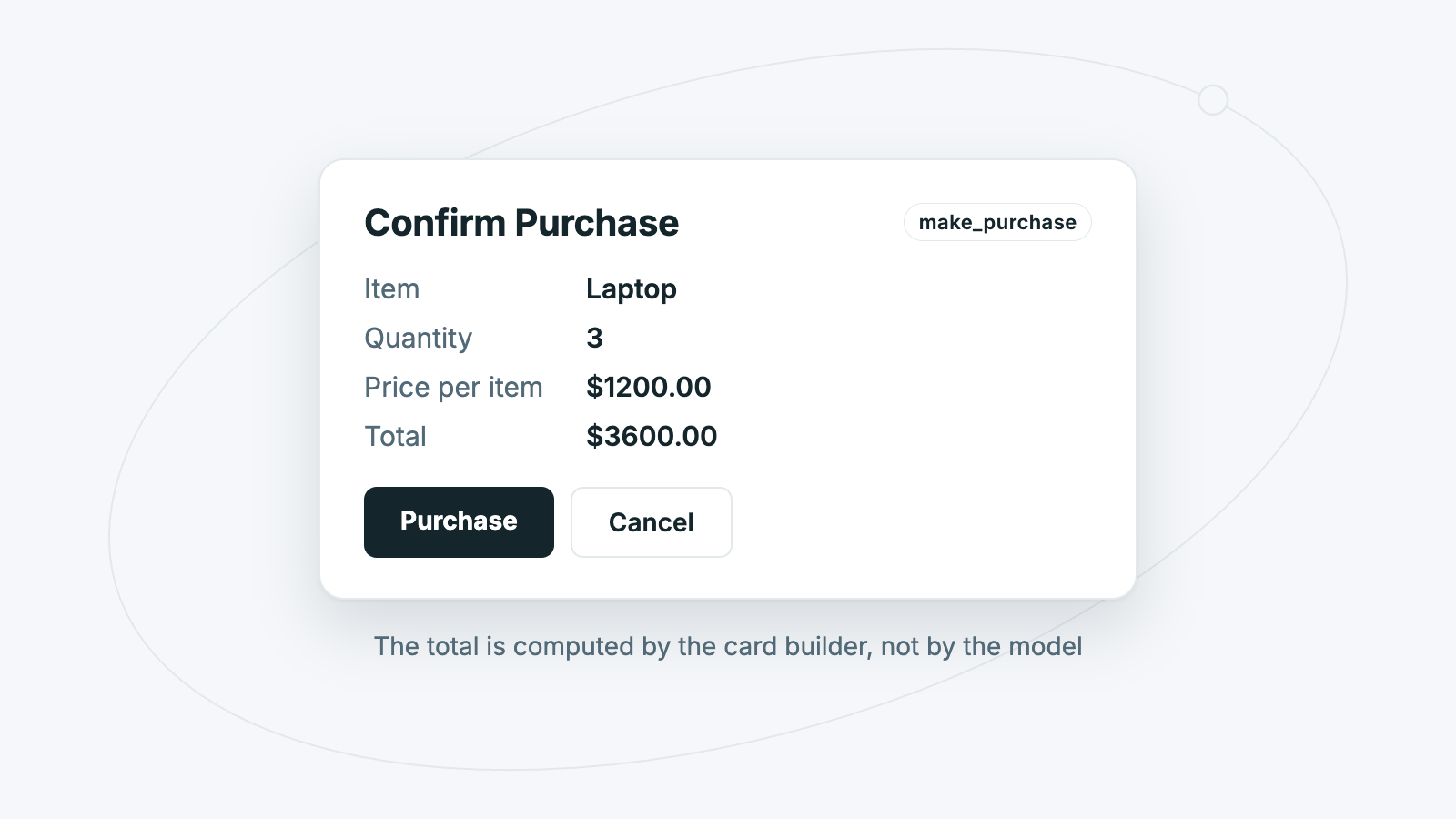
Builders don’t have to remember the plumbing either. Before the card goes out, TRUE ADK walks every Button component and injects the call ID and tool name into its event context, so a builder that only sets the value of true or false still produces buttons the backend can match to the paused call.
When a tool has no builder, the framework falls back to a default card. Its title is the label from the chat config or the tool name made readable (make_purchase becomes “Make Purchase”). Below it go the first three arguments as key and value pairs, with long strings truncated and lists collapsed to a count. That’s enough to be safe on an internal tool. A tool that customers touch deserves its own builder with its own words, like the deletion card in the demo that spells out that the action can’t be undone and labels its buttons Delete and Keep.
Custom components work the same way. A registry can declare a catalog ID and component names such as StatGrid and Badge for richer cards. GET /api/ui-config tells a frontend which custom components to expect. The catalog ID has to match on both sides. The endpoint also lets a frontend prepare fallback renderers for components it doesn’t know, so a version mismatch degrades instead of breaking.
Keeping it fast
The cost of a confirmation lands only where it buys something, because the flag is per tool. Reads never ask. A conversation that makes five lookups and one write pays for exactly one click, at the moment it matters.
Google ADK also accepts a function instead of True for require_confirmation. It gets the call’s arguments and returns whether this particular call needs a person, which is how you’d confirm purchases above some amount and let small ones through. Our confirmable() helper wraps tools with a plain True, so a threshold like that means building the FunctionTool directly with the function.
Keeping the card short matters as much as when it appears. The demo’s email card shows the recipient and subject plus only the first hundred characters of the body. A person reads it in a couple of seconds and decides. If the card reproduced the whole email, most people would scroll straight past it to the button.
Where the check belongs
Put the check where the model can’t talk its way around it. A prompt instruction is a request to the model, while require_confirmation is a property of the tool that ADK enforces whatever the model decides. Build the card from the arguments the tool will receive and compute derived values like totals in code. Label the buttons with the verb that will happen (Purchase, Send Email, Delete, Keep) instead of a generic OK, since the label is the last thing a person reads before committing.
And remember what the card is not. It’s a person agreeing to a specific action. It doesn’t replace authorization inside the tool, so a purchase tool should still check that this user is allowed to buy, whether or not someone pressed the button.